Make the route make sense
Compare private transport, buses and rental cars where information is available. Plan airport connections, onward towns and longer journeys. Unknown fares or road metrics stay clearly marked for confirmation.
 airporticeland.ICELAND · GMT
Plan routes. Save trips.
Explore Iceland.
A simple mobile companion for planning and travelling around Iceland. From your first airport connection to the next town, day trip or change of plan.
Use it in your browser. Add it to your phone when you are ready.
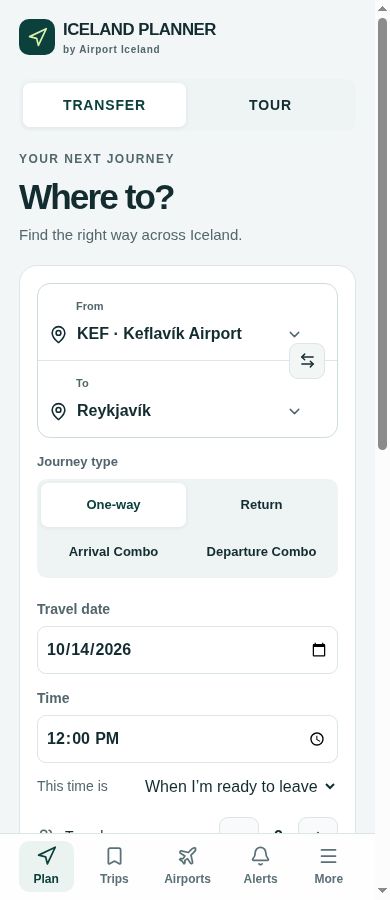
Compare private transport, buses and rental cars where information is available. Plan airport connections, onward towns and longer journeys. Unknown fares or road metrics stay clearly marked for confirmation.
Save a journey after viewing the result, then reopen it from Your Trips. No account needed. Saved plans stay on this device and are not reservations.
Passenger count, large cases and special luggage shape the vehicle recommendation. Seat count alone does not guarantee enough bag space.
Plan a direct spa journey or an arrival/departure combo. Check the admission slot, baggage and onward ride separately from your road journey.
Consider Golden Circle or South Coast days from Reykjavík. Starting at KEF or staying in Vík changes the sensible itinerary, duration and pricing basis.
Find airport context, official road and safety links, the emergency number and indicative currency conversions. Reference information is not a live weather, road or flight feed.
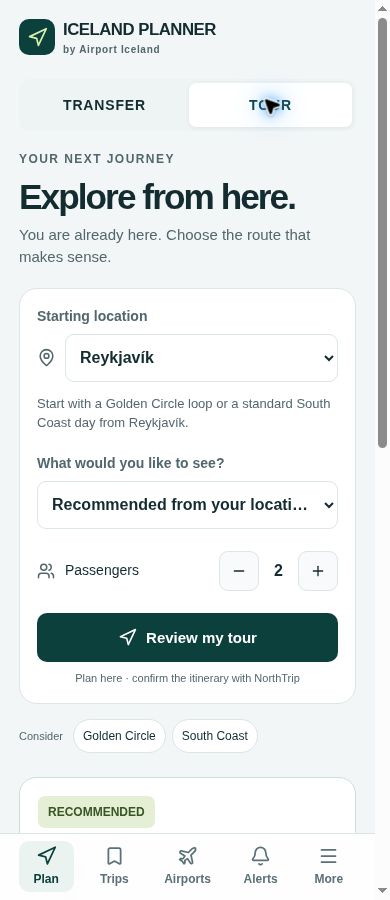
Smart Tours considers your starting point before suggesting the day. A Reykjavík Golden Circle loop is different from an eastbound day from Vík.
Published private-tour prices apply to their stated departure point and passenger band. Other pickups and extended days need a custom quote. Long same-day returns receive practical warnings.
Plan here. Confirm the itinerary with the provider. Attraction access, weather and road conditions still matter.
Explore in Iceland PlannerOpen the app first, then follow the steps for your device. No app store needed.
Iceland Planner appears on your Home Screen. The same approach works on iPad.
Install Iceland PlannerWording varies. Chrome may show “Install and create shortcut”, then “Install”.
Install Iceland PlannerUse Iceland Planner in your desktop browser, or open the same address on your phone.

Scan to install on your phone.
Direct to the app. No redirect or tracking service.
You can always use the app in your browser. Installation controls depend on your device and browser.
Website journeys are not automatically transferred into the app. Open Iceland Planner to plan and save them there. Clearing browser or app data removes saved trips; browser and installed-app storage may be separate.
A plan is not a booking. Transport comparisons stay independent; commercial providers are identified. Confirm price, pickup and availability on the provider’s website.
Airport Iceland remains your guide to routes, airports and transport options across Iceland.